Jon Cairns / BlogMy journey through software development and management.2025-12-12T10:05:22+00:00https://blog.joncairns.com/Jon Cairnshttps://blog.joncairns.comA Fresh Start2025-12-10T23:25:00+00:002025-12-10T23:25:00+00:00https://blog.joncairns.com/2025/12/a-fresh-start/Jon CairnsIt’s been 10 years since my last post. I can hardly believe it. In that time, my blog has laid in waiting, wondering when I would return (and install an SSL certificate). Well, that day has arrived, and I can officially declare this blog reopened.
I used to post a random smattering of things: ruby, unix and vim tips; a once popular foobar2000 tutorial (if you don’t know what that is, look it up); occasional bits of news; and more “articley” things. I’m probably going to focus more on the latter, from here on in. Things in the software world that catch my eye, working with people, management stories, even life stories. All my old posts will remain available, but hidden from the home page. You can find them via search or tags if you need them.
I’ll try and post once every couple of months. Hopefully you’ll find this fresh start interesting. And hopefully it won’t be a false start.
PS: I may use AI generated images for my posts, but I’ll never use AI to write any of my posts. What’s the point of that?
]]>Better Rails debugging with pry2015-11-05T00:00:00+00:002015-11-05T00:00:00+00:00https://blog.joncairns.com/2015/11/better-rails-debugging-with-pry/Jon Cairns
Pry is an interactive console, like IRB, which can be used to pause execution and inspect the current scope in your Rails web requests or tests. I’m going to show you how simple it is to drop it into your Rails apps and get better visibility over bugs.
Install pry
Simply add this to your Gemfile:
group:development,:testdogem"pry"end
and run bundle install. Adding it to the development and test groups means that it you’ll be able to use it when debugging in the browser and when running the test suite.
Debugging the rails server
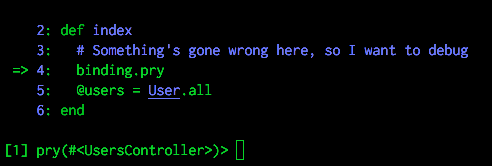
You can insert the line binding.pry wherever you want in your rails app, and when you visit a URL that hits that line, the interactive Pry console will appear within the rails server output.
For example:
classUsersControllerdefindex# Something's gone wrong here, so I want to debugbinding.pry@users=User.allendend
The rails console will show something like the following:
You can execute any ruby code in the current scope
Since you can execute any ruby code in the current scope, you can debug local variables, check the contents of the database using ActiveRecord models and even modify variables. There’s a huge amount you can do with pry: check the wiki for more information.
When you’ve finished, just type exit to carry on with the execution of your code.
Debugging tests
This is where I’ve found pry to be the most useful. You use it in exactly the same way, i.e. put binding.pry wherever you want, and the Pry console will appear when you run rake. If you use guard then it will show inside the guard console.
This is incredibly useful for acceptance/integration tests, where sometimes it can be hard to get a picture of what’s going on in a complex system. Bugs are common and often hard to debug when using headless browsers, and even swapping to a visual browser doesn’t make it that easy. Pausing test execution with binding.pry allows you to get a good picture of what’s going on. For instance, you can run Capybara queries inside the pry console, to find out why they’re failing in your tests.
Adding fine-grained debugging control
If you’re looking for more control over debugging, such as being able to step through code, you can add the pry-byebug gem. This extends to functionality of pry to add these commands, allowing you to move between stack frames easily.
]]>Communication: how to be a better software developer (via Medium)2015-10-21T15:08:33+00:002015-10-21T15:08:33+00:00https://blog.joncairns.com/2015/10/communication-how-to-be-a-better-software-developer/Jon CairnsLink: Communication: how to be a better software developer
I haven’t written a Medium post for a while, but felt like Medium was a better place for this post to appear. It presents my ideas on how social skills are essential in software development. Please read it, and share if you enjoy!
]]>Use git to comment your code (and stop writing rubbish commit messages, please)2015-09-29T14:08:25+00:002015-09-29T14:08:25+00:00https://blog.joncairns.com/2015/09/use-git-to-comment-your-code/Jon CairnsOver recent years we’ve seen the software community debate the usefulness of comments (this article being an example), and rightly so. The main argument is against explanatory comments, i.e. “this code is doing X”, as the ideal situation is that the code is written in a way that means it’s readable and self-explanatory. The problem with comments like this is that they easily become out of date, as someone makes a quick change to the code without reading and updating the associated comment. You then have the issue of a comment which directly contradicts the code it’s meant to be explaining.
Another kind of comment that doesn’t belong in the code is one like “I changed this because…”, or what I’ll call revision comments. I’d argue that these comments are just as prone to becoming out of date and contradictory as explanatory comments, and that they actually belong in the logs of your version control system. Git tracks the way your code changes over time and stores a human readable description of what changed at each commit. If your commit messages are written with this in mind then they become more like documentation for the history of your code.
The scourge of lazy commit messages
Have you ever thought about the purpose of your commit message? Do you write it thinking that nobody will ever read it again? Do any of these sound familiar?
updates
fixes
added feature x
I’ve absolutely been guilty of this in the past. If you consistently write commit messages like the above then you can guarantee that no-one will ever read them, as they’re practically useless. They’ll eventually be able to work out what changed by looking through the diffs of your commits, but they won’t necessarily be able to work out why you made those changes. This valuable piece of information exists only in your head, and probably only for a few months at most.
On a more basic level, if you want to reset your codebase to a particular commit, scanning through a series of commits that don’t have descriptive names means that you have no choice but to check the diffs. Don’t do that to someone - it’s mean.
Have you ever been in the situation where someone asks you why you made a particular change, only for you to come up with a total blank? Or, if you reverse the situation, have you ever looked at someone else’s code and needed to know why it’s evolved the way it has? I know there have been times where I’ve made some code “simpler”, only to find that there was a very specific reason as to why it was written that way, and I’ve broken it.
The ideal situation is that our commit messages are targeted, clear and relevant, first describing the change and then why it has been made. You can then call on the git logs to describe the changes to a repository, a single file or even a given line in a file. Using these logs can help future developers (and future you) to know if they’re about to make a big mistake in changing something that you changed for a very good reason 17 months ago.
Make regular, smaller commits
Although I’ve come a long way in writing descriptive commit messages, I still sometimes forget to commit regularly when I’m in the flow of things. This means that I end up committing a huge chunk of code at a time, with multiple unrelated changes. When this happens, it’s pretty much impossible to write a useful commit message.
If you can’t describe the changes in a couple of setences, it’s best to break it down in to multiple commits. And if you make multiple changes that are totally independent of each other then they should go in separate commits. This is useful not just for providing clear commit messages, but also if you need to revert the changes introduced by a single commit. I’ve been in the situation where I’ve had to undo one half of a large commit that someone made a while back, and I can promise you that it’s not fun.
A case study for “commenting” your code with git
Let’s say I have a web app that involves a very common task: validating user-submitted passwords. Here’s the very simple class that does the job:
commit 9eab442bf5d7f9dcd285412b8281e1bed0ca7cfa
Author: Jon Cairns <jon@joncairns.com>
Date:   Tue Sep 29 15:04:01 2015 +0100

    Add password validator

    Valid passwords are at least 6 characters long and contain only regex
    word characters.
Even if you aren’t familiar with ruby, the commit message explains what the class does at this stage. There’s no need to add a comment to the code, as it’s very simple. But even if you did want some detail, the git log will always be there, unlike a comment which can easily be deleted.
NB: I like to write git commit messages in the present tense, imperative style, as recommended by git itself. This is because each commit is a description of how it changes the codebase. So I use “change” instead of “changes” or “changed”, and “fix” instead of “fixes” or “fixed”.
All code is susceptible to change. And in this case, after some testing, we’ve realised that we’ve got a potential bug in the code: there’s no maximum limit on the length of the password, but our database column only allows 64 character strings. To avoid truncation, we update the regular expression:
tree 882a887ed4b5259ef6e6921119e0aef6a9b04c25
parent 9eab442bf5d7f9dcd285412b8281e1bed0ca7cfa
author Jon Cairns <jon@joncairns.com> Tue Sep 29 15:30:14 2015 +0100
committer Jon Cairns <jon@joncairns.com> Tue Sep 29 15:30:14 2015 +0100

Restrict valid passwords to be 64 characters long

Since the database field has a 64 character limit, passwords should
only be declared valid by the PasswordValidator if they're 64 characters
or fewer.
The commit says not only what changed but, crucially, why it was changed. The code is kept clean, without being littered with comments, but the history of the code is always available on demand.
If we carry on in this vein, this class will have a history of detailed and specific commit messages, as opposed to a series of “Updated password validator” messages.
How to see the code history
There are a number of commands that will help you view commits over time and, combined with the long list of possible arguments, practically endless ways of viewing the information. Here are two that I find particularly useful.
git log
Run without any arguments, git log will show you all commits in your current branch, in descending date order. You can make this more targeted by showing only the commits that affect a single file, with git log -- <path/to/file>, and you can even show the full diffs alongside with the -p argument:
$ git log -p -- password_validator.rb
commit daca6dae0ca00ef954a2e4bc85b57a3c63bd3e1e
Author: Jon Cairns <jon@joncairns.com>
Date: Tue Sep 29 15:30:14 2015 +0100
Restrict valid passwords to be 64 characters long
Since the database field has a 64 character limit, passwords should
only be declared valid by the PasswordValidator if they're 64 characters
or fewer.
diff --git a/password_validator.rb b/password_validator.rb
index 6735a39..06d4a2a 100644
--- a/password_validator.rb
+++ b/password_validator.rb
@@ -1,9 +1,5 @@
class PasswordValidator
- def initialize(password)
- @password = password
- end
-
- def valid?
- !!(password =~ /^\w{6,}$/)
+ def valid?(password)
+ password =~ /^\w{6,64}$/
end
end
commit 9eab442bf5d7f9dcd285412b8281e1bed0ca7cfa
Author: Jon Cairns <jon@joncairns.com>
Date: Tue Sep 29 15:04:01 2015 +0100
Add password validator
Valid passwords are at least 6 characters long and contain only word
characters.
diff --git a/password_validator.rb b/password_validator.rb
new file mode 100644
index 0000000..6735a39
--- /dev/null
+++ b/password_validator.rb
@@ -0,0 +1,9 @@+class PasswordValidator
+ def initialize(password)
+ @password = password
+ end
+
+ def valid?
+ !!(password =~ /^\w{6,}$/)
+ end
+end
You can also view the commit log for a specific line (or range) with -L, and using the format <line>:<file>:
$ git log -p-L 3:password_validator.rb
...
git blame
The name of this command suggests a certain level of aggression, but I find it helpful to get an overview of how a file has been affected by commits over time. The output gives each line of a file prepended with the details of the most recent commit that affected that line, including the author of that commit:
You can view the full commit with git show <commit-sha>, to see the commit message and full diff.
Conclusion
Better commit messages can save you and people working on the same project from potential future headaches, and will help you to learn why your code has evolved in the way it has. This will add a certain level of protection against bugs, and works as a kind of documentation. Get to know git log and git blame, and use them to understand the code your about to change.
]]>6 useful and lesser-known git commands2015-05-28T10:26:06+00:002015-05-28T10:26:06+00:00https://blog.joncairns.com/2015/05/6-useful-and-lesser-known-git-commands/Jon CairnsGit is such a complex tool that I often feel as if I’m barely using 10% of it’s complete functionality. The various commands range from the absolutely essential (commit, push, pull) to the more exotic (cherry-pick, rebase), to the downright obscure or scary (fsck, merge-octopus, quiltimport). You can generally get by with knowing the basic functions of a small set of commands, that allow you to push, pull, commit, change branches and merge. However, this list compiles 6 commands that you may not know about that have seriously improved the way in which I use git.
1. git log -p <path>
I recently came across this as I was searching for an easy way of tracking a file’s changes over time. git log is git’s way of showing you the history of your codebase, and adding a path to the command will limit the log to the changes in that one file. Finally, the -p flag includes the diff on the file at each commit, so you can see exactly how the file has changed at each point in the history of the code. Example:
$ git log -p README.md
commit 524d044afdbedafd94e81c5a0434150efd3a2860
Author: Jon Cairns <jon@ggapps.co.uk>
Date:   Thu Sep 18 15:30:00 2014 +0100

    Update README

diff --git a/README.md b/README.md
index 8f73735..082d6fa 100644
--- a/README.md
+++ b/README.md
@@ -4,4 +4,4 @@ It's been created with Jekyll. Feel free to poke around.

 Social images courtesy of http://bostinno.streetwise.co/channels/social-media-share-icons-simple-modern-download/.

-It builds automatically using a Bitbucket POST hook and a basic sinatra app.
+It builds automatically using a Bitbucket POST hook and a basic sinatra app, but for security reasons the S3 configuration has been left out.

commit df259431cbd3e6844a100ca5bc31d7c518595e86
Author: Jon Cairns <jon@ggapps.co.uk>
Date:   Fri Jun 20 12:03:41 2014 +0100

    Testing bitbucket web hook

diff --git a/README.md b/README.md
index ac10f9e..8f73735 100644
--- a/README.md
+++ b/README.md
@@ -3,3 +3,5 @@
 It's been created with Jekyll. Feel free to poke around.

 Social images courtesy of http://bostinno.streetwise.co/channels/social-media-share-icons-simple-modern-download/.
+
+It builds automatically using a Bitbucket POST hook and a basic sinatra app.
...
It’s worth getting to grips with diff formatting, as git uses it extensively.
2. git checkout <commit>
If you want to see the state of your code at a particular point in history, git makes this trivial. Just run this command with a commit hash as the argument (you can use git log to find the hash you want to revert to). For example:
$ git checkout 05c5fa
Note: checking out '05c5fa'.
You are in'detached HEAD' state. You can look around, make experimental
changes and commit them, and you can discard any commits you make in this
state without impacting any branches by performing another checkout.
If you want to create a new branch to retain commits you create, you may
do so (now or later) by using -b with the checkout command again. Example:
git checkout -b new_branch_name
HEAD is now at 05c5fa... Merge branch 'master' of bitbucket.org:etc/etc
As shown above, git will tell you that you’re in a “‘detached HEAD’ state”. This means that any changes won’t affect the state of your code before you checked out. To get back to your original state, just run git checkout master (replace master with whichever branch you were on, if different).
3. git checkout <tree-ish> – <path>
Surprisingly unrelated to the command above (a bug-bear of some git critics), this command allows you to pull a file at a given commit into your current workspace. This is useful in the case when you need to restore a deleted file, or restore a file to a previous state.
Here, <tree-ish> refers to a commit hash, tag or branch, and <path> is the path of the file relative to the top directory of the project. Here’s an example:
$ git checkout 05c5fa -- config/routes.rb
Note that this will overwrite any existing file at the same path in your working tree.
4. git stash
This is an extremely useful command that isn’t as well known as it should be. If you have uncommitted changes in your tree (i.e. it’s “dirty”, in git language) that you want to temporarily undo, then this command allows you to stash them for later. This is particularly useful if you want to check the state of your code before your changes, or if you want to merge in someone elses code but aren’t yet ready to commit your code as it is.
Stashed changes go into a list, or stack. You can then re-apply these changes when you want, in any order you choose. Here’s an example:
$ echo"This is a change">> README
$ git status
On branch master
Your branch is up-to-date with 'origin/master'.
Changes not staged for commit:
(use "git add <file>..." to update what will be committed)(use "git checkout -- <file>..." to discard changes in working directory)
modified: README.md
no changes added to commit (use "git add" and/or "git commit -a")$ git stash
Saved working directory and index state WIP on master: c689fa6 Add second part of refactoring post
HEAD is now at c689fa6 Add second part of refactoring post
$ git status
On branch master
Your branch is up-to-date with 'origin/master'.
nothing to commit, working directory clean
So I made a change to a file (one that was already tracked by git), which made my working tree dirty, and then used stash to restore my tree to how it was at the previous commit.
I can see the stash list with git stash list and restore the changes by using git stash apply:
$ git stash list
stash@{0}: WIP on master: c689fa6 Add second part of refactoring post
$ git stash apply
On branch master
Your branch is up-to-date with 'origin/master'.
Changes not staged for commit:
(use "git add <file>..." to update what will be committed)(use "git checkout -- <file>..." to discard changes in working directory)
modified: README.md
no changes added to commit (use "git add" and/or "git commit -a")
If you have multiple items in your stash list, you can specify the stash to restore by using the full name when applying, e.g. git stash apply stash@{1}.
Using stash is a handy way of temporarily reverting and re-applying changes to your working tree.
5. git cherry-pick <commit>
This command allows you to apply a single commit to your working tree. For example, if there’s a commit in another branch that you want to apply but the branch isn’t ready to fully merge, you can use this command to grab that commit and drop it in to your current branch. Here’s an example, merging a single commit from master to random-branch:
The tricky thing with this is that you can easily end up with merge conflicts. The trouble with picking a commit out of nowhere is that it may relate to files that don’t exist in your working tree, or are very different to the existing files.
One very useful application of this is when you have a project with a separate production and staging branch. For example, if something gets fixed on the staging branch, alongside some new features being developed, and the fix needs to be applied to the production branch, cherry-pick can be used to apply only those fixes.
6. git annotate <file>
This handy command shows each line of a file next to information about which commit last changed that line, when it changed and who changed it. Example:
$ git annotate Readme
a6b6e79d        (Jon Cairns     2014-04-03 10:11:29 +0100       1)# My blog
a6b6e79d        (Jon Cairns     2014-04-03 10:11:29 +0100       2)
524d044a        (Abe Lincoln    2014-04-03 10:11:29 +0100       3)It's been created with Jekyll. Feel free to poke around.
a6b6e79d        (Jon Cairns     2014-04-03 10:11:29 +0100       4)
a6b6e79d        (Jon Cairns     2014-04-03 10:11:29 +0100       5)Social images courtesy of http://bostinno.streetwise.co/channels/social-media-share-icons-simple-modern-download/.
df259431        (Jon Cairns     2014-06-20 12:03:41 +0100       6)
524d044a        (Abe Lincoln    2014-09-18 15:30:00 +0100       7)It builds automatically using a Bitbucket POST hook and a basic sinatra app, but for security reasons the S3 configuration has been left out.
And so on
These are just a few commands that will help you with your git knowledge. I’d encourage you to take a look at the full list of commands (git help -a), and also to read the man pages for the individual commands (git <command> --help), as certain options can affect the output of commands in very helpful ways.
]]>Rescuing web apps (part 2)2015-05-26T10:50:52+00:002015-05-26T10:50:52+00:00https://blog.joncairns.com/2015/05/rescuing-web-apps-part-2/Jon CairnsIn the second part of this post on rescuing web applications, I’ll go through some techniques for refactoring the codebase of an existing project. This is for the case where you’ve decided that there is hope for your project, and that the best course is to take the time to fix what’s already there, as opposed to starting again from scratch.
Here are some general tips for refactoring a large codebase.
1. Run static analysis tools on your project
There’s a reason that this is step 1. Can you quantify the problems with your codebase? If not, there are tools available for all of the most popular web languages that will help you to determine the most problematic areas of your code. The best way to use these tools is by tracking the change over a period of time, e.g. by setting up your project with continuous integration, running the static analysis tools on each build and keeping the output. It’s a great feeling to see the health of your project tangibly improve as you refactor.
Check if there are tools available for your language that track the following metrics:
Code coverage - absolutely essential for determining how much of your code is covered by tests
Cyclomatic complexity (i.e. nested if statements and loops)
With these few metrics, you can get some numerical snapshots of the health of your app. Improvements in these metrics should be fed back to the team, because it’s a good source of encouragement.
2. Rank the areas that need refactoring
There are 3 factors that I take into account when deciding which part of the codebase to refactor first:
The results of the metrics from step 1
The most critical features of the app
Which areas of the codebase which have historically been the buggiest or most problematic
This means that the biggest spaghetti mess of code may be relating to a fairly unimportant feature, so you may choose to write more unit tests for the super critical payment system instead.
In your team, break down each section of code that needs refactoring, and give them a rank based on their importance and current code quality. This gives you your plan of attack. When you’ve decided on your first task, move on to the next section.
3. Work out the scope of the problem
Is the problem purely in the quality of the code? I.e. does the feature do what it’s supposed to or is it fundamentally broken? Are there working and useful tests around the feature?
If the feature doesn’t work, or needs drastic modification, it may be that you need to consider rewriting that section entirely.
4. Test first
If your test suite doesn’t fully cover the code that you’re refactoring, now’s the time to write tests. I’ll assume that you’re able to implement these three levels of test:
High level end-to-end (acceptance) tests, e.g. with a tool like capybara or selenium
Integration or functional tests, e.g. testing the behaviour of controllers or groups of objects
Unit tests, i.e. testing individual objects
Unit tests
The most useful tests in refactoring are unit tests. It’s perfectly reasonable to write unit tests that cover practically every path through your code (save for an infinite number of input values). However, I’ve found that it’s rarely the case that we can keep the original unit tests when performing a large-scale refactor. This is because it’s unlikely that your problems are confined to a single class. Often during a refactor, new classes are introduced, object APIs change and existing classes are deleted entirely. Delete the related unit tests if you know that you’re going to have to completely change the classes involved, and rely on higher level tests instead.
Integration/functional tests
Integration/functional tests are the next most useful, as they will tell you whether your app is still working at a higher level as you refactor. For instance, a controller will orchestrate a series of objects and render a view. Make sure you have tests that cover it; specifically tests that check the outputs as opposed to the behaviour, since the behaviour will change during the refactor. Integration tests are less informative than unit tests, since it’s often impractical to test every path through the code at this level. As more objects become involved in the stack, the number of possible inputs, outputs and paths increase exponentially. Nevertheless, an integration test is infinitely preferable to no test at all.
End-to-end acceptance tests
If, for whatever reason, you can’t rely on unit tests or integration tests, make sure that you have a few end-to-end tests. A possible scenario for this would be where you have a feature that needs a total rewrite, including big UI changes that span multiple pages of your application. For instance, if your controllers, routes and models change, then you have no way of using existing integration or unit tests. Just bear in mind that the more disruptive the refactor is, the less certain you can be that you won’t have introduced more bugs in the process.
In summary, the lower level tests are the most useful, and will give you quicker and more accurate feedback about the impact of your refactor. As the scope of your refactor increases you’ll be forced to rely on higher level tests, which will give less certainty about the positive and negative effects.
If you don’t have any tests covering the existing feature, I’d suggest writing some end-to-end tests that confirm the current behaviour. Then, if possible, write some integration tests. Work your way down from high- to low- level tests, stopping at the point where your refactor would break your new tests.
5. Test a bit more
When you finally start your refactor, you’ll either be writing new tests from scratch or relying on existing tests, and ensuring that passing tests don’t fail after the refactor. It (hopefully) goes without saying that new code should be thoroughly tested, to avoid ending up in the same situation as before.
The new code doesn’t have to be perfect, but if it’s well tested then the likelihood is that it’s well-factored, and can therefore be easily manipulated in the future if necessary.
6. Manually check the result
We often place so much faith in our test suite that we cut corners when testing the app manually. Just remember this: you can write code with 100% test coverage that does absolutely nothing. Code coverage isn’t a measure of feature completion, so don’t skip the vital stage of manually checking that everything still works together.
7. Profit?
The benefit of a large refactor is rarely seen in the short-term, apart from in the minds and hearts of the developers working on it. However, the chances are that it will save time in the future, and therefore money.
]]>Rescuing web apps (part 1)2015-05-18T12:11:16+00:002015-05-18T12:11:16+00:00https://blog.joncairns.com/2015/05/rescuing-web-apps-part-1/Jon CairnsMost programmers have the best of intentions. We all like to produce code that: a) nails a particular feature; b) runs quickly; and c) reads well. Despite these intentions, we’ve all ended up in the situation where our code has degraded into something ugly, unperformant or useless (aliteration unintentional). Sometimes it’s out of our hands, e.g. when a client decides that yesterday’s critical feature is no longer on their agenda, leaving redundant code littered through our project. Sometimes it’s preventable, like when we gradually add tiny bits of code without refactoring to adopt it, or without introducing new tests. However it happens, it’s an inevitabilty that we need to accept. In fact, rescuing projects from these situations help us learn and grow as developers.
I, like a lot of programmers, have a streak of perfectionism. When some code starts flashing red warning signs, our overwhelming feeling is to throw it out and start again from scratch. We think something along the lines of, “well that ended up badly, but this time the code will be PERFECT”. This is fine on a small scale, such as a handful of classes or methods. But when a whole project ends up in this situation, the decision to scrap the existing code and start from the beginning is not one that should be taken lightly. I’ve seen many cases of project rewrites that never get out of the door, often hindered by perfectionism that came about as a response to the failure of the previous version.
We shouldn’t be scared of refactoring. It’s an inevitable part of the development process, and trying to write perfect code that never needs a refactor is both impossible and paralyzing. On the other hand, we shouldn’t be scared of rewriting, and shouldn’t dismiss the idea entirely; the difficult thing is to know when to do which.
In this first part of my guide to rescuing web applications, I’ll give some pointers to help you determine what state your project is in and therefore whether it’s better to refactor or rewrite. In the second part I’ll give some tips on how to do both of these on a practical level.
1. Work out what’s gone wrong
Obviously, you can’t set out fixing a problem before you’ve worked out exactly what’s gone wrong. There are many reasons why a project can turn sour, but here are a few of the most common ones:
The feature requirements suddenly change to the point where the existing project needs a huge overhaul.
Months of sub-par development or shortcuts has lead to a spaghetti mess of code.
The test suite is poor or non-existent and bugs are coming thick and fast, hindering the team’s progress.
The framework(s) that the project is built on becomes obsolete, or becomes unusable for the purpose of the project.
The project is built on an outdated version of the framework, where updating would create many breaking changes.
The project isn’t built on a framework at all, and is now unsustainable.
In my opinion, numbers 4 and 6 are the only ones in this list that pretty much require a project to be rewritten. It’s very rare that you can move code between two web frameworks, and I’ve not yet seen a successful and relatively complex web application that isn’t built upon a framework (however, I’m not claiming that it’s impossible).
All other situations require a careful audit of your project before writing any healing code.
2. Make estimates for refactoring and rewriting
Consider both options equally. How long would it take to rewrite the project from scratch? How long would it take to refactor the existing code? Take the following into account:
Database schema: is it quicker to build a new one, or modify the existing one?
Controllers, views, models, tests, supporting classes. We often overlook things that work in a “problem” project, and focus on the nasty areas. That can mean that we vastly underestimate how much time it took to create all these different parts in the first place. Creating them from scratch could take a lot longer than you think.
Is the existing test suite useful? Even if it has problems, think very hard before throwing it away, as problems can be fixed.
How long would it take to set up a completely new project? We often vastly underestimate this.
Is the project’s design and aesthetics getting in the way of your decision? An ugly site can be turned around very quickly but, in my experience, has a considerable effect on our mental state as developers on the project.
3. Be honest with yourself
Admit your biases. A rewrite feels “cleaner”, but time is pretty much always the biggest factor in a situation like this. How long would it take to get a rewrite to a usable state? Would you have to maintain the existing codebase alongside the rewrite? If so, that’s a huge undertaking, and there’s a likelihood that the rewrite will never be finished as the two projects diverge.
If the project already fullfils the needs of the user or client and your issue is purely with the quality of the code, is your desire to rewrite the project a personal crusade? If the app does what it’s supposed to do, that’s the perfect scenario to refactor the codebase piece-by-piece.
Our preference is always to write new, beautiful code over maintaing ugly, messy code. But if we’re truly honest with ourselves, it’s often quicker to refactor than rewrite. This becomes more true the longer the project has been running, unless it gets to the point where a large proportion of the features are no longer needed.
The bottom line is to be practical and realistic when weighing up the two options, and don’t let your idealism get in the way.
4. Make sure the rest of the team is with you
If you’re the decision maker, don’t push ahead without getting the support of your team. Put forward your idea and the reasons behind it, and listen to the opinions of others. This is true for pretty much everything, but definitely applies in this case. A large-scale refactor or total rewrite is a big deal and the whole team needs ownership of the idea, otherwise demoralising moments will be much tougher.
If you’re not the decision maker but feel like a bad decision is being made, speak up! If you don’t feel like you can then that’s a separate and more serious environmental issue.
5. Set achievable goals
I’ll discuss this in more detail in the next couple of parts, but break the project down into small, measurable chunks of work. Release the project (externally if possible, but at least internally) after each chunk. Don’t make your goal “rewrite the project”. Collect as many metrics as you possibly can on the quality of the code; this is particularly effective when refactoring, as it’s really encouraging to see code quality and test coverage metrics climb as the project improves.
]]>Looking for another vdebug maintainer2015-01-30T00:00:00+00:002015-01-30T00:00:00+00:00https://blog.joncairns.com/2015/01/looking-for-another-vdebug-maintainer/Jon CairnsBack in 2011 I created the Vdebug plugin for Vim, which provides a visual debugger interface for debuggers that support the DBGP protocol, the main one being Xdebug for PHP. I created it mostly for myself, as I wasn’t happy with the other plugins out there. At the time I was almost entirely developing in PHP, but Python was the first language that I really enjoyed, so Vdebug was an opportunity to return to it.
I had no idea that it would become so popular; as it stands currently, 399 people have starred the repo on Github and there are 63 forks. I don’t think a week has gone by where there hasn’t been any activity in the issues section. Github tells me that there have been 268 unique clones in the last two weeks. That’s exciting, but with that comes a certain level of responsibility. This was the first project that I created that had any real traction, so I was learning how to manage open-source projects as I went. Basic lessons, like “don’t push code that breaks stuff”, were learnt early on.
I’m absolutely thrilled that so many people have enjoyed Vdebug. I’ve had strangers email me out of the blue to tell me how much the project has helped them, and how thankful they are for it, which is amazing. People who create issues on Github are almost always incredibly friendly and happy to help where they can.
The problem for me is this: 2 years ago I all but stopped developing in PHP, in favour of Ruby. About 90% of my work is in Ruby, and the other 10% split between PHP, Java, Objective-C, JavaScript and, for the purposes of Vdebug, Python. The debugging scene for Ruby is… mixed. The only DBGP compatible project (that I know of) is maintained by ActiveState for the purposes of Komodo IDE. And for some reason, whenever I download their source code I have to hack on it for a good half an hour to get it to work properly (sorry, ActiveState). It sort of works, but whenever I come across a need for debugging it’s always the last thing on my list.
So, in short, I don’t really use Vdebug myself all that much anymore. I’m torn between wanting to maintain this project for the apparently large number of people who use it and spending my time on projects that will help me in my current work. I have loads of ideas for Vdebug but not the time to do them justice. On top of that, I became a Dad last year, and my time has been mysteriously sucked away.
For that reason, I’m reaching out to any Vim-using Python developers (or, most likely, PHP developers with some knowledge of Python). I can manage bits of development here and there, but I’m struggling to find time to respond to issues in a timely manner (sorry to everyone who I’ve made wait a month, or even more, for a response :/). If there’s anyone out there who’s happy to roll up their sleeves and join me in maintaining this project then I’d be much more confident about it lasting, and not disappearing into insignificance.
If anyone’s interested, please contact me by clicking on the mail icon in the menu, and we’ll work out whether it’s something you can get involved in. Thanks, and happy debugging!
]]>Evaluate ruby (or any command) and insert into Vim buffers2014-10-28T00:00:00+00:002014-10-28T00:00:00+00:00https://blog.joncairns.com/2014/10/evaluate-ruby-or-any-command-and-insert-into-vim-buffers/Jon CairnsSomething I commonly want to do is evaluate a bit of code and insert the result into my Vim window. For example, if I want to generate a 40-character UID, I could use ruby’s SecureRandom class:
require'securerandom'putsSecureRandom.hex(40)
As you’ll probably know you can run ruby code directly from Vim, as a command:
This prints it out, but doesn’t do anything else with the output. However, we can capture the output of any command and add it into a register. We can then use that register to modify our current buffer. Here’s a quick function I wrote to do that:
function! InsertCommand(command)redir=> output
silentexecutea:commandredir END
callfeedkeys('i'.substitute(output,'^[\n]*\(.\{-}\)[\n]*$','\1','gm'))endfunction
Firstly, this redirects all output into the output register. Then, it executes whichever command has been passed as an argument. It then stops the redirection and inserts the register into the current cursor position (after stripping all surrounding whitespace and new lines).
This allows us to capture the output of any command, e.g.:
Which allows us to execute any vim command and insert the output into the buffer:
:I echo "WIN"
Job done - no need for a plugin.
]]>Monit style alerts for Systemd2014-09-18T00:00:00+00:002014-09-18T00:00:00+00:00https://blog.joncairns.com/2014/09/monit-style-alerts-for-Systemd/Jon Cairns
TL;DR
I created a ruby gem to provide email and slack notifications for Systemd services, which gives visibility over process stops, starts, restarts and reloads. This post documents why and how.
I also need some testers, so if this is relevant to you please give it a go and send the appropriate feedback.
In an upcoming post I’m planning on explaining the benefits of Systemd for managing processes on servers. If you don’t know what Systemd is, this post probably isn’t for you - read the upcoming post instead.
If you use Systemd, and are the kind of person that likes to monitor server activity, you might have noticed that there’s no easy way to send alerts when a unit fails. This person on this mailing list shares my surprise at the fact that there’s no built in way of monitoring units.
I previously used monit, which is a great tool. However, monit not only sends notifications for failed processes but also takes on the mantle of restarting these processes. Since Systemd does that already I didn’t want them stepping on eachother’s toes. I simply wanted notifications on process activity.
I also use Zabbix for general server monitoring, such as processor load, disk usage, etc. Although it can monitor processes, it uses a polling mechanism. If a process fails and restarts within a few seconds, there’s a very high chance that this failure wouldn’t be picked up. Therefore, Zabbix and similar system monitors aren’t suitable.
The requirements
The notifier should:
notify about stop, start, restart and reload states
be able to send email notifications, and have a pluggable interface for allowing other kinds of notifications (e.g. Slack, HipChat, etc.)
not use a polling mechanism. Processes can change state many times in under a second, and polling at that frequency would be far too resource-intensive
sit quietly in the background until something happens (i.e. no “busy-loops”)
I couldn’t find any pre-existing tool that fit these requirements, so the plan was to create one specifically for Systemd.
The solution
Follow the thread through and you see people talking about the D-Bus message system, and how Systemd uses D-Bus to send notifications. Someone even posted a Python script (that I sadly couldn’t get to work), which gave a quick example of how to plug in to the Systemd messages.
However, Python is my number two language choice, after Ruby. A quick Google search revealed the ruby-dbus library, which has some great examples for getting started quickly.
Systemd sends a signal when the state of a unit changes (the PropertiesChanged signal), and provides an interface for querying specific units and their state. In our ruby code, we can register a listener which responds to a signal. When a signal is sent, we can then query the unit’s state and see what’s changed. A “simple” script would look something like this:
require'dbus'dbus=DBus::SystemBus.instancesystemd_service=dbus.service("org.freedesktop.systemd1")systemd_object=systemd_service.object("/org/freedesktop/systemd1")systemd_object.introspect# Required, to load the APIsystemd_object.Subscribe# Required, to tell systemd to send signalsunit_def=systemd_object.GetUnit('cron.service')unit=systemd_service.object(unit_def[0])unit.introspectunit.default_iface="org.freedesktop.DBus.Properties"# Where we register our callbackunit.on_signal("PropertiesChanged")do|iface|ififace=="org.freedesktop.systemd1.Unit"active_state=unit.Get("org.freedesktop.systemd1.Unit","ActiveState").firstputsactive_stateendend# Start the dbus loopmain=DBus::Main.newmain<<dbusmain.run
If you aren’t familiar with D-Bus, most of this will seem foreign to you. There’s a lot of stuff in there; the concepts of interfaces and objects takes a while to digest.
To test this script simply install the ruby-dbus library and run. It will attach to the D-Bus main loop, and will wait for a change in the cron.service. Then, in another terminal, run sudo systemctl stop cron.service. You should see the script print out something like:
deactivating
inactive
Then start the service again, and you will see:
activating
active
So we can see that Systemd sends signals at a granular level. Not only does it tell us about starts and stops, but it also tells us about mid-state changes like “deactivating”. This is great, but also a slight concern for building a notification system. As nice as it is to know when a unit is deactivating, it’s probably only important to know that it is inactive - we don’t want to be spammed with notifications.
Enter systemd_mon
From the concepts that I learnt regarding D-Bus and Systemd, I decided that a ruby gem was the best way to go for building a notifier. A quick script like the above would quickly get out of hand. I created systemd_mon, which, at the time of writing, is at version 0.0.2.
I overcame the signal granularity issue by combining states. For instance, deactivating followed by inactive would be combined into a single state, which would then be passed on to whichever notifiers are loaded.
It also keeps a short history of states. For instance, if a unit is inactive, goes to activiating and then back to inactive, that can be summarised as “still failing”. The email notifier sends some tabular information showing how the state of the unit has changed recently.
Currently, two notifiers are supported: email and Slack. The plan is to extend this list, and also make it easy for people to create new notifier gems that plug in to systemd_mon.
Another feature I added was to send a notification when system_mon itself starts or stops. There is still the issue of SIGKILL signals bypassing Ruby’s at_exit handler, but that’s (hopefully) a fairly rare case. Also, it’s recommended to add another more general level of server monitoring, e.g. Nagios or Zabbix, which can just keep a watch on systemd_mon (e.g. check it’s running once a minute).
Usage
For full usage instructions check the README on the Github repository. The quick summary is that you define a YAML file containing the units that you want to monitor, plus the configuration for the notifier(s) that you want to use. You then run systemd_mon path/to/config.yml. This can easily be added as a Systemd unit, allowing it to run in the background.
Next steps
As I’ve said, I plan to add more notifiers. Or at least encourage others to do so.
There are a few quirks to iron out, mainly with the summarising of unit states, but I’ve been using it for a month now on about five different servers and have already discovered issues in our software that I wouldn’t have otherwise known.
If you’ve made it this far in this post, I take it that this is relevant to you. The most useful thing to me at the moment is testing, particularly across different versions of Systemd (I’ve been using 204). So feel free to give it a try and open Github issues as needed.
Contributions are more than welcome, via pull requests.
 You can execute any ruby code in the current scope